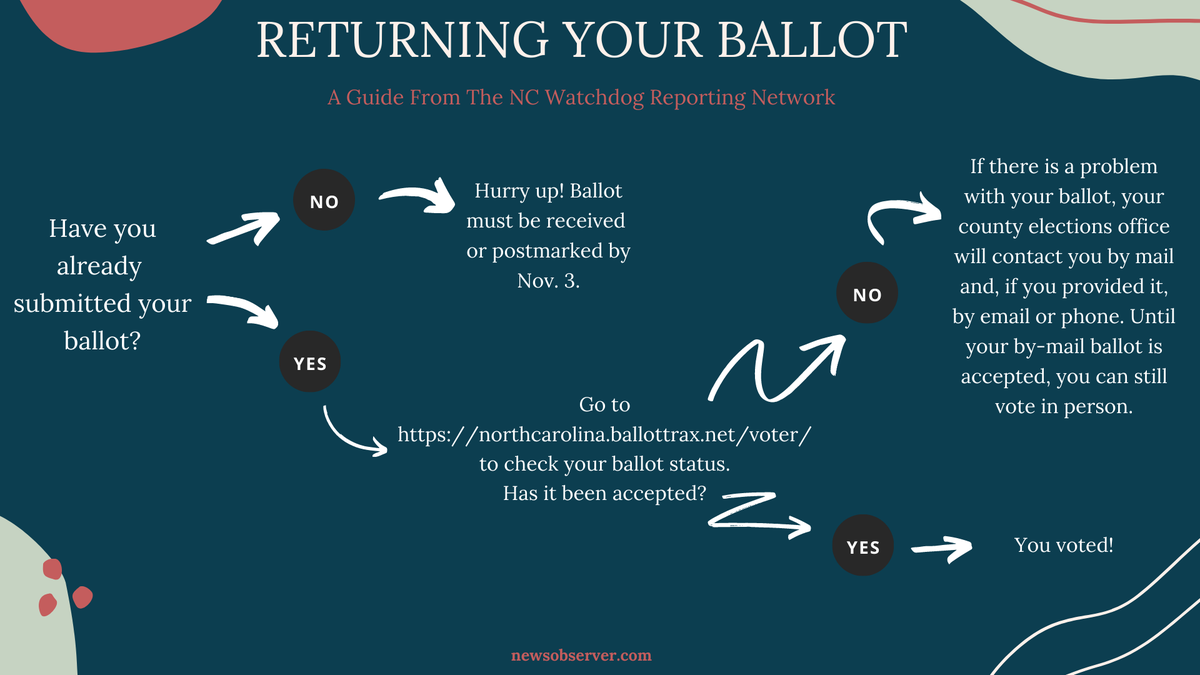
Here’s how to make sure your absentee ballot was accepted in North Carolina
A record number of North Carolina voters are casting absentee ballots this year. If you’re among them, here’s how to check the status of your absentee ballot, including when it is accepted.
BallotTrax
By creating an account on the website BallotTrax, which can be found here, North Carolina voters can check the status of their mail-in ballot. The site will tell you whether you’re ballot was received by the county board of elections or if it was not accepted due to “issues such as a missing signature or witness information.”
”Accepted generally means the county board of elections has received the ballot, the return envelope has no apparent issues, and the ballot will be counted,” state Board of Elections says.
Voter Search Tool
Voters can also check if their absentee ballot was accepted by searching their name on the state’s online Voter Search Tool.
When a voter’s ballot is accepted by the county elections board, it will show up on the Voter Search Tool under the “Your Absentee Ballot” drop-down menu.
Contact your county elections board
For questions that can’t be answered through BallotTrax or the Voter Search Tool, voters should contact the county board of elections, state election officials say.
“Please be advised that county board offices are extremely busy,” the the state board says.
Mail-in ballots must be postmarked by Nov. 3 to be counted. They can also be dropped off by 5 p.m. Nov. 3 at the voter’s county board of elections office.